How to prove it’s a Microsoft Defender Vulnerability Management reporting artifact not a real exposure and what to do about 400+ “exposed” devices.
Defender Vulnerability Management (MDVM) started showing CVE-2023-36010, a December 2023 Microsoft Defender denial-of-service bug across hundreds of endpoints in mid-June 2026, even though every device is on the latest Defender platform.
The CVE was fixed in Malware Protection Platform 4.18.23110.3. Affected fleets are on 4.18.26050.15, patched many versions over. The endpoints are genuinely protected.
A 3-year-old CVE lighting up a fully patched fleet overnight is the signature of a Microsoft-side MDVM detection-logic false positive, not endpoint drift. As of writing it is NOT on Microsoft’s fixed-inaccuracies list so it’s an open, unacknowledged FP. Bottom line: verify you’re patched, report the inaccuracy, suppress it so it stops skewing your exposure score, and track Microsoft’s fix page. Don’t reimage, don’t panic, don’t “remediate” something that’s already remediated.
The symptom
If you live in the Defender portal, you may have opened the Microsoft Windows Defender software page recently and found a brand-new “discovered vulnerability” that makes no sense: CVE-2023-36010, High severity, CVSS 7.5, suddenly showing a huge device count under exposed devices.
This isn’t isolated. r/sysadmin lit up around the same time with admins reporting the identical pattern, the old Defender CVE flagged even on machines confirmed to be running the current security intelligence, engine, and platform builds. Same story across multiple managed tenants.
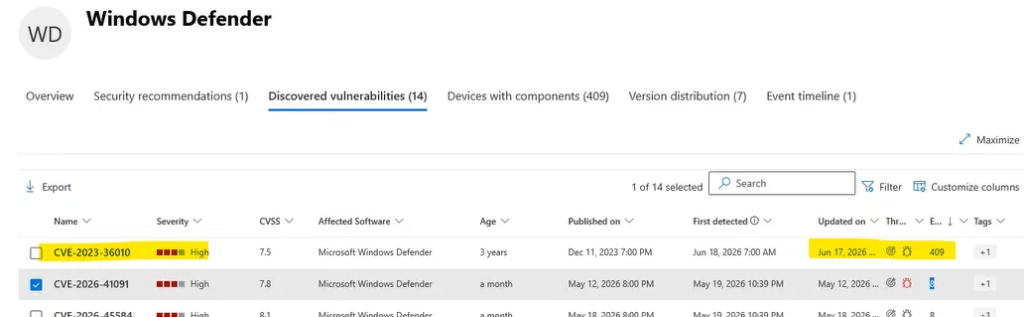
THE TELL
Look at the dates on the row: First detected Jun 18 2026, Updated Jun 17 2026. A vulnerability published in December 2023 does not naturally “appear” for the first time across your whole fleet in June 2026. Nothing changed on the endpoints, something changed in Microsoft’s catalog.
What CVE-2023-36010 actually is
CVE-2023-36010 is a denial-of-service vulnerability in the Microsoft Malware Protection Platform, the component that runs Microsoft Defender Antivirus. Exploited, it could disrupt Defender’s protection service. Microsoft shipped the fix through the normal Defender platform update channel, which auto-updates on virtually every managed Windows device.
| Attribute | Value |
| CVE | CVE-2023-36010 |
| Title | Microsoft Defender Denial of Service Vulnerability |
| Published | December 11, 2023 |
| Severity / CVSS | High / 7.5 |
| Affected component | Microsoft Malware Protection Platform |
| Fixed in platform | 4.18.23110.3 and later |
| Typical detection logic | Version of ProtectionManagement.dll + WinDefend service running |
The patched-from version is the key number: 4.18.23110.3. Anything at or above that is fixed. The current platform builds in mid-2026 are in the 4.18.260xx range, roughly 30 monthly platform releases newer.
Why this is a false positive (the proof)
Here are the build numbers from an affected fleet, straight off the current Defender update channel:
Security intelligence (signature) : 1.453.259.0
Engine version : 1.1.26050.11
Platform version : 4.18.26050.15
Released : 6/24/2026
Now line that up against the patch bar for the CVE:
| Platform version | Status | Verdict |
| 4.18.23110.3 | Patched-from | Fixed |
| 4.18.26050.15 (your fleet) | Current | Fixed |
CONCLUSION
Your devices satisfy and massively exceed the patched version for CVE-2023-36010. The exposure shown in MDVM does not reflect the real state of the endpoints. This is a reporting artifact in the vulnerability catalog, not a live exposure.
Root-cause analysis: what’s really happening
MDVM builds the “Microsoft Windows Defender” software entry from file evidence collected on each device and matches it against Microsoft’s vulnerability catalog. Two mechanisms can produce this exact symptom; in this case the evidence points squarely at the first.
1. Catalog-side detection-logic regression (primary cause)
The fleet-wide, overnight appearance of a 3-year-old CVE — with Updated/First-detected timestamps clustered around June 17–18, 2026 is the classic fingerprint of a backend change to MDVM’s detection logic for this CVE. When Microsoft re-publishes or re-evaluates a detection rule and the new version-comparison logic is wrong (e.g., a normalization bug in how it parses the 4.18.260xx platform string, or an inverted/missing upper-bound check), every current device suddenly “matches” the vulnerable condition at the same time. The endpoints never changed; the rule did.
2. Leftover platform folders feeding stale file evidence (possible contributor)
Defender keeps each platform build in its own versioned folder under C:\ProgramData\Microsoft\Windows Defender\Platform\<version>\. The active build is the highest version present; older folders are normally cleaned up but can linger after upgrades. If a leftover folder still contains an old ProtectionManagement.dll below 4.18.23110.3, an evidence-based scan can pick up that stale file and report the device as vulnerable even though the running build is current.
WORTH CHECKING, BUT NOT THE WHOLE STORY
If only a handful of devices were affected, leftover folders would be a strong lead. At 400+ devices flipping at once on a uniformly patched fleet, the catalog-side regression is the dominant cause, leftover folders (if any) just make individual devices noisier. Check both; don’t assume cleanup alone will clear the count.
NOT YET ACKNOWLEDGED BY MICROSOFT
As of this writing, CVE-2023-36010 does NOT appear on Microsoft’s Fixed reported inaccuracies list for MDVM. That means it’s an open false positive reporting it actually helps Microsoft prioritize the fix and gives you a paper trail for clients.
Step 1 – Verify the endpoints really are patched
Before you tell anyone “it’s a false positive,” prove it. Run this on a representative affected device (or push it through Live Response / a remediation script). It prints the running Defender versions and the actual file version of ProtectionManagement.dll in the active platform folder.
Run as SYSTEM / admin
# --- Confirm running Defender build vs CVE-2023-36010 patch bar (4.18.23110.3) ---
$s = Get-MpComputerStatus
[pscustomobject]@{
    Computer            = $env:COMPUTERNAME
    AMServiceVersion    = $s.AMServiceVersion
    AMEngineVersion     = $s.AMEngineVersion
    AMProductVersion    = $s.AMProductVersion
    SignatureVersion    = $s.AntivirusSignatureVersion
    RealTimeProtection  = $s.RealTimeProtectionEnabled
} | Format-List

# Active platform folder = highest version under ProgramData
$plat = Get-ChildItem 'C:\ProgramData\Microsoft\Windows Defender\Platform' -Directory |
        Sort-Object Name -Descending | Select-Object -First 1
$dll  = Join-Path $plat.FullName 'ProtectionManagement.dll'
if (Test-Path $dll) {
    $v = (Get-Item $dll).VersionInfo.FileVersion
    Write-Host "ProtectionManagement.dll (active): $v"
}
If AMServiceVersion / AMProductVersion are 4.18.23110.3 or higher (they will be, you’re on 4.18.260xx), the device is patched. Full stop.
Step 2 – Check for (and clean) leftover platform folders
Enumerate every platform folder on the device. More than one is normal during an upgrade window; the concern is an OLD folder (below 4.18.23110.3) sticking around long-term.
Inventory platform folders
# List all installed Defender platform versions on this device
Get-ChildItem 'C:\ProgramData\Microsoft\Windows Defender\Platform' -Directory |
    Sort-Object Name |
    Select-Object Name, LastWriteTime
CLEANUP – HANDLE WITH CARE
Defender manages these folders itself and aggressively protects them (tamper protection / SYSTEM ACLs). Do NOT bulk-delete platform folders.
Preferred, safe approach: force a platform/signature update and reboot, then let Defender reconcile:
“%ProgramFiles%\Windows Defender\MpCmdRun.exe” -SignatureUpdate Only consider manual removal of a confirmed-stale old folder if Microsoft Support directs you to, and never the active (highest-version) folder.
Step 3 – Scope the blast radius with Advanced Hunting
Pull the exact device list MDVM thinks is exposed so you can size the impact and, later, confirm the count drops once Microsoft fixes the catalog. Run in Defender XDR → Advanced Hunting.
KQL — confirm what version MDVM thinks is installed
DeviceTvmSoftwareVulnerabilities
| where CveId == "CVE-2023-36010"
| summarize Devices = dcount(DeviceId) by SoftwareName, SoftwareVersion, RecommendedSecurityUpdate
| order by Devices desc
The interesting column is SoftwareVersion. You’ll typically see it reporting a current 4.18.260xx build alongside the vulnerability, which is itself proof the catalog logic is wrong, because that version is patched.
KQL — full affected device list for your records
DeviceTvmSoftwareVulnerabilities
| where CveId == "CVE-2023-36010"
| distinct DeviceId, DeviceName, SoftwareVersion, OSPlatform
| order by DeviceName asc
Step 4 – Report the inaccuracy to Microsoft
This is the step most people skip and it’s the one that actually gets it fixed. MDVM has a built-in inaccuracy reporting flow:
- In the Defender portal, open Vulnerability management → Weaknesses (or Exposure management) and find CVE-2023-36010.
- Open the CVE flyout, choose the … (more actions) menu, and select Report inaccuracy.
- Set the category to False positive and state, concisely: “Devices report current platform 4.18.26050.x; CVE-2023-36010 was fixed in 4.18.23110.3. Detection logic is flagging patched builds.”
- Note your inaccuracy report ID. When the fix lands, it shows up on the public Fixed reported inaccuracies page with that ID, your evidence the loop is closed.
Step 5 – Stop it from skewing your exposure score
While you wait on Microsoft, that bogus High finding inflates exposure scores and clutters client-facing reports. You have two levers, depending on how your tenant is set up:
- Create an exception / recommendation suppression for the related security recommendation so it stops contributing to the exposure score. Scope it tightly to this CVE and add a justification note referencing your inaccuracy report ID and the patch-version evidence.
- Document, don’t delete. Keep the exception time-boxed (e.g., 60 days) so it auto-expires and you re-confirm the FP is gone rather than silently masking a future real finding.
DO NOT
Don’t reimage, don’t reinstall Defender, and don’t run “remediation” to push a platform update that’s already installed. The endpoints are fine. The only thing broken is the report.
Talking points for clients / leadership
When a security dashboard shows 400+ High-severity exposed devices, someone is going to ask. Keep it short and confident:
- “It’s a reporting artifact, not an exposure.” All devices are on the latest Defender platform, which fixed this CVE in late 2023.
- “We’ve verified it on the endpoints.” Running build is 4.18.26050.x; the patch bar is 4.18.23110.3.
- “It’s a known platform-wide issue.” Other organizations are seeing the same overnight appearance; it’s a Microsoft catalog-side detection bug.
- “We’ve reported it and suppressed the noise.” Inaccuracy filed with Microsoft; a time-boxed exception keeps the exposure score accurate while we wait for the fix.
Key takeaways
- Read the dates. A 3-year-old CVE that appears fleet-wide overnight is almost always a catalog/detection-logic change, not endpoint drift.
- Know the patch bar. CVE-2023-36010 was fixed in Defender platform 4.18.23110.3, trivially below any current build.
- Prove it on the box. Get-MpComputerStatus + the active ProtectionManagement.dll version is your proof.
- Report it. It’s not on Microsoft’s fixed-inaccuracies list yet, filing the inaccuracy is how it gets prioritized.
- Suppress, don’t “fix.” Time-boxed exception keeps your exposure score honest without masking future real findings.