Here Is What MDASH Is, What It Found, and How Intune Admins Should Respond
Key facts – May 12, 2026
Microsoft announced MDASH (Multi-model Agentic Scanning Harness) – an AI system that autonomously finds exploitable vulnerabilities in Windows code.
MDASH found 16 CVEs in the Windows network stack and authentication services, all patched in today’s Patch Tuesday (KB5089549).
4 of the 16 are Critical severity – including pre-authentication Remote Code Execution in tcpip.sys and ikeext.dll.
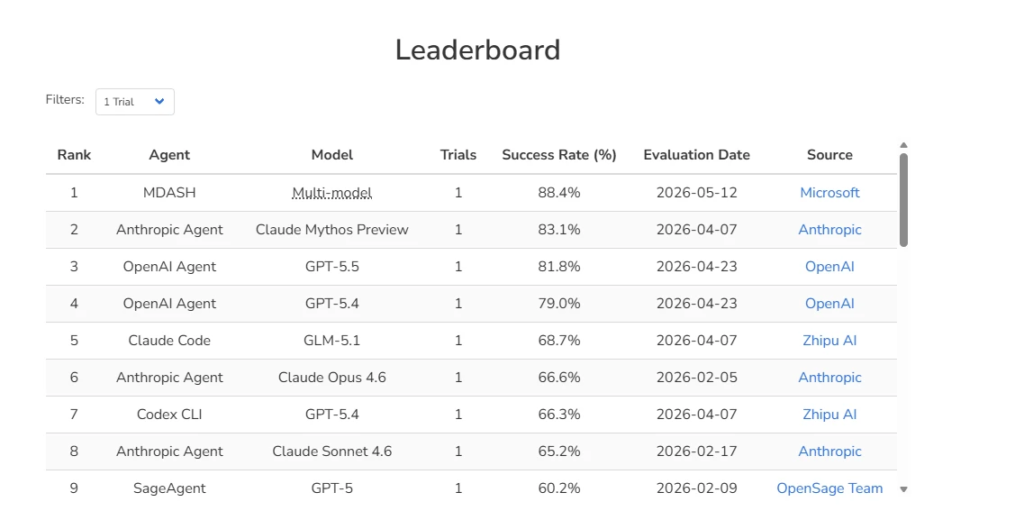
MDASH scored 88.45% on the public CyberGym benchmark of 1,507 real-world vulnerabilities – top of the global leaderboard.
Recall: 96% on 5 years of MSRC cases in clfs.sys, 100% on 5 years of tcpip.sys cases.
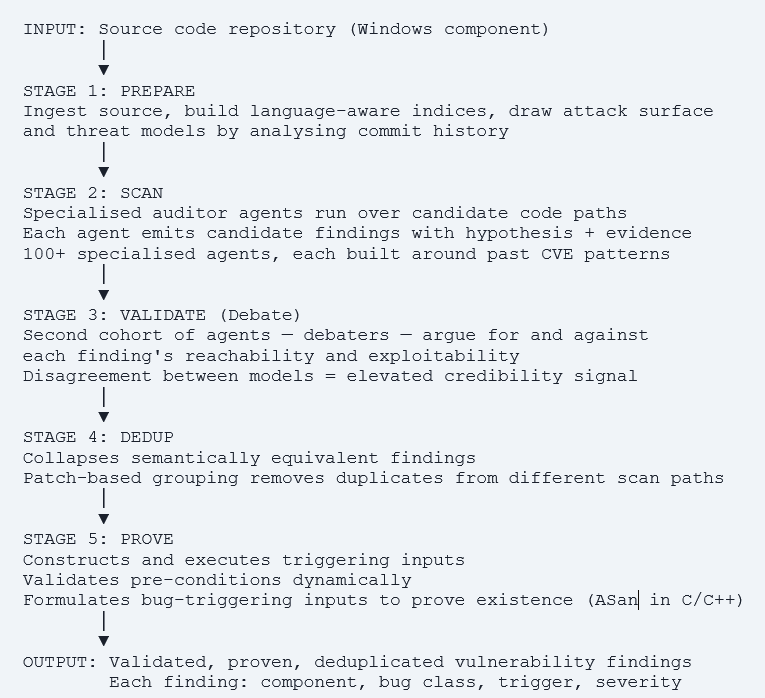
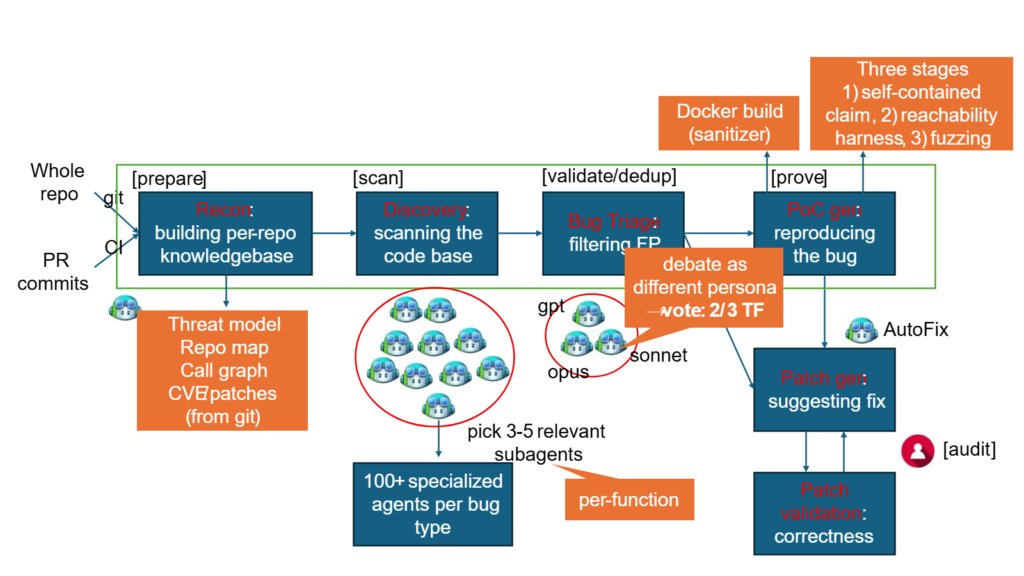
MDASH uses 100+ specialised AI agents across multiple frontier and distilled models – debate, validate, and prove each finding end-to-end.
Intune admin action: verify KB5089549 is deployed to all managed devices – these CVEs are now public knowledge for attackers. Preview available: https://aka.ms/AI-drivenScanningHarness
Why MDASH Changes the Vulnerability Management Equation
For as long as vulnerability management has existed as a discipline, the race has been asymmetric. Attackers have time, motivation, and the ability to focus on a single target. Defenders have to protect every surface, update every component, and triage every CVE while running production systems. AI-assisted vulnerability discovery has been discussed as a potential rebalancing mechanism for years but until now, the results from AI systems have not been convincing enough to treat them as production-grade tools.
MDASH changes that. The numbers Microsoft published on May 12, 2026 are not research-paper results on toy codebases, they are performance metrics on Windows itself, one of the most complex and heavily audited proprietary codebases in the world. A system that achieves 100% recall against five years of confirmed tcpip.sys MSRC cases – meaning it would have found every real vulnerability that real attackers exploited over that period is not a research curiosity. It is a production defence capability.
The immediate enterprise implication is straightforward: the 16 CVEs patched today were found by Microsoft’s AI before any external researcher or attacker published them. That window between discovery and public disclosure is precisely when patches matter most. But once today’s Patch Tuesday bulletin is public, every attacker who reads it knows exactly which components are vulnerable on unpatched devices. The patch becomes a reverse roadmap for exploitation.
This guide explains how MDASH works technically, what the 16 CVEs it found actually do, and — critically for Intune administrators how to verify your managed fleet received today’s patches before your devices become targets.
What Is MDASH – Technical Architecture
MDASH stands for Multi-model Agentic Scanning Harness. It was built by Microsoft’s Autonomous Code Security (ACS) team, several of whose members came from Team Atlanta the group that won the $20 million DARPA AI Cyber Challenge by building an autonomous system that found and patched real bugs in complex open-source projects.
The key architectural insight behind MDASH is stated explicitly in Microsoft’s announcement: the model is one input the system is the product. This distinguishes MDASH from earlier AI security tools that used a single large language model with a long prompt asking it to find bugs. Single-model approaches fail on complex real-world code for two reasons: no single model is best at every stage of vulnerability research, and a model that both proposes and validates its own findings has no independent check on its reasoning.
Microsoft Image Above
The Five-Stage Pipeline
MDASH operates as a structured pipeline that takes a codebase as input and emits validated, proven findings as output. Each stage has dedicated specialised agents:
The Multi-Model Ensemble – Why It Outperforms Single Models
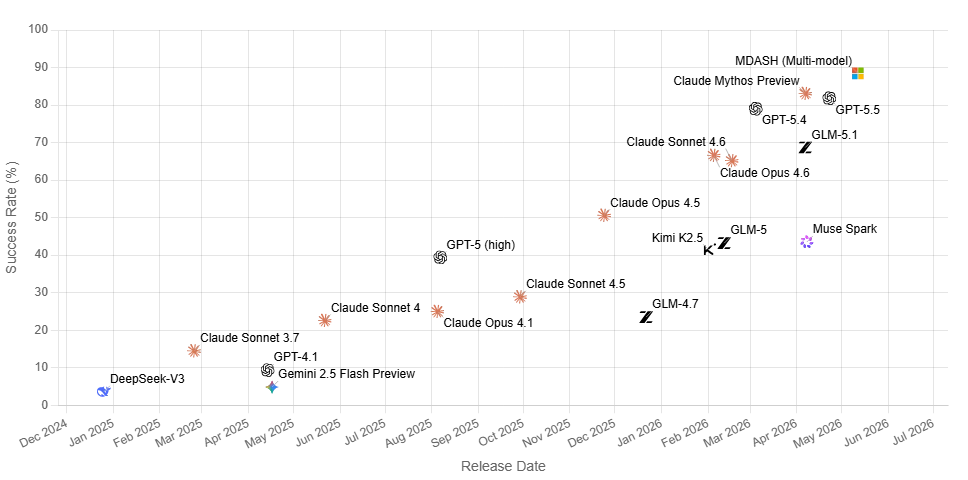
MDASH runs a configurable panel of AI models not a single model across the pipeline stages. The ensemble design has three properties that make it effective on real-world enterprise code:
- SOTA models as heavy reasoners: State-of-the-art frontier models handle the most complex analysis tasks deep reasoning about kernel calling conventions, IRP invariants, lock ordering, and IPC trust boundaries.
- Distilled models as high-volume debaters: Cost-effective smaller models run the debate stage at high volume. Running thousands of debate passes with a frontier model would be prohibitively expensive distilled models make the validation stage practical at scale.
- Independent counterpoint model: A separate SOTA model provides an independent perspective. When the auditor flags something as suspect and the debater cannot refute it, the finding’s posterior credibility increases. When both models independently converge on a finding, confidence is highest.
The multi-model design also gives MDASH architectural resilience across AI model generations. When a new, more capable model is released, swapping it into the relevant pipeline stage is a configuration change the harness, plugins, scope files, and calibrations all carry over. Microsoft describes this as portability across model generations.
Microsoft Image Above
Domain Plugins Why Windows Code Is Different
Windows kernel code presents challenges that general-purpose AI models cannot handle from training data alone — Microsoft’s codebase is private and not part of any model’s training corpus. MDASH addresses this with an extensible plugin architecture that lets domain experts inject context the foundation models cannot derive on their own:
- Kernel calling conventions how arguments pass between kernel and user mode
- IRP (I/O Request Packet) rules – the protocol governing driver I/O handling
- Lock ordering invariants – which locks can be held simultaneously without deadlock
- IPC trust boundaries – which cross-process communication paths carry user-controlled data
- Custom code analysis databases – component-specific semantic knowledge
- CodeQL database integration – existing static analysis results augment AI reasoning
The CLFS (Common Log File System) proving plugin is a specific example: a domain plugin that constructs a triggering log file given a candidate finding in CLFS. This is the kind of component-specific knowledge that transforms a theoretical bug hypothesis into a proven, reproducible vulnerability report.
Benchmark Performance – The Numbers
| Benchmark | Result | Context |
| StorageDrive (private test driver, 21 planted bugs) | 21/21 found, 0 false positives | Private codebase cannot be in training data. Approximates professional offensive researcher performance. |
| clfs.sys MSRC recall (5 years of confirmed CVEs) | 96% recall | Tested against pre-patch snapshots. Would have found 96% of real bugs that required Patch Tuesday. |
| tcpip.sys MSRC recall (5 years of confirmed CVEs) | 100% recall | Perfect recall across all confirmed MSRC cases in the Windows TCP/IP stack over 5 years. |
| CyberGym public benchmark (1,507 real-world CVEs) | 88.45% — #1 on global leaderboard | Roughly 5 points ahead of the next entry on the public leaderboard at time of publication. |
What 100% tcpip.sys recall means in practice
The Windows TCP/IP stack is the most attacked component in Windows networking. Over five years, every CVE in this component that required a Patch Tuesday fix was a real vulnerability found by real attackers or researchers that had real-world exploitation potential. MDASH, when run against pre-patch snapshots of those components, found all of them. This is not a benchmark on synthetic problems, it is a retrospective validation against the ground truth of what mattered most to attackers over half a decade.
The 16 CVEs – What MDASH Found in Windows
All 16 CVEs were found by MDASH scanning the Windows networking stack and adjacent authentication services. They are all patched in today’s Patch Tuesday (KB5089549 for Windows 11 24H2/25H2, KB5087420 for 23H2). Here is the complete table followed by deep dives on the most critical findings.
| CVE | Component | Description | Severity | Type | Enterprise Risk |
| CVE-2026-33827 | tcpip.sys | Remote unauth UAF via SSRR IPv4 packets | Critical | RCE | Any Windows device reachable on network |
| CVE-2026-33824 | ikeext.dll | Unauth IKEv2 SA_INIT double-free → LocalSystem RCE | Critical | RCE | VPN/DirectAccess/Always-On VPN infra |
| CVE-2026-41089 | Netlogon | Stack overflow → unauthenticated DC RCE | Critical | RCE | Every domain controller |
| CVE-2026-41096 | DNS Client | Crafted DNS response → unauthenticated RCE | Critical | RCE | Every Windows device issuing DNS queries |
| CVE-2026-40413 | tcpip.sys | NULL deref via crafted IPv6 extension headers | Important | DoS | Network-reachable devices |
| CVE-2026-40405 | tcpip.sys | DoS via ESP SA refcount underflow | Important | DoS | IPsec-enabled endpoints |
| CVE-2026-40406 | tcpip.sys | UAF in Ipv4pReassembleDatagram → info disclosure | Important | Info Disclosure | Network-reachable devices |
| CVE-2026-35422 | tcpip.sys | IPsec cross-SA fragment splicing via reassembly | Important | RCE | IPsec-configured networks |
| CVE-2026-40402 | Hyper-V | EoP in Windows hypervisor | Important | Elevation of Privilege | Virtualised environments |
| Remaining 7 | Various Windows networking + auth | Mix of DoS, Info Disclosure, EoP, RCE | Important | Various | Network-dependent |
Microsoft Image Above
Deep Dive – CVE-2026-33827: tcpip.sys Remote Unauthenticated UAF via SSRR
This is the most technically striking of the 16 CVEs. It is a use-after-free vulnerability in the Windows IPv4 TCP/IP stack triggered by a specially crafted packet carrying the Strict Source and Record Route (SSRR) IPv4 option, a legitimate but rarely used IP routing option that has been supported in Windows for decades.
What SSRR Is and Why It Is Dangerous Here
The Strict Source and Record Route option is an IPv4 option field (option type 0x89) that instructs the IP stack to route a packet through a specific sequence of intermediate hops specified by the sender. The sending host provides a list of IP addresses; the packet must traverse exactly those intermediate hosts in order, recording each hop’s address as it passes through.
In practice, SSRR is almost never used in modern enterprise networks, it is a legacy routing mechanism from the early internet. However, Windows parses it on every IPv4 packet that arrives carrying option type 0x89, regardless of whether the network uses it. This parser is the attack surface.
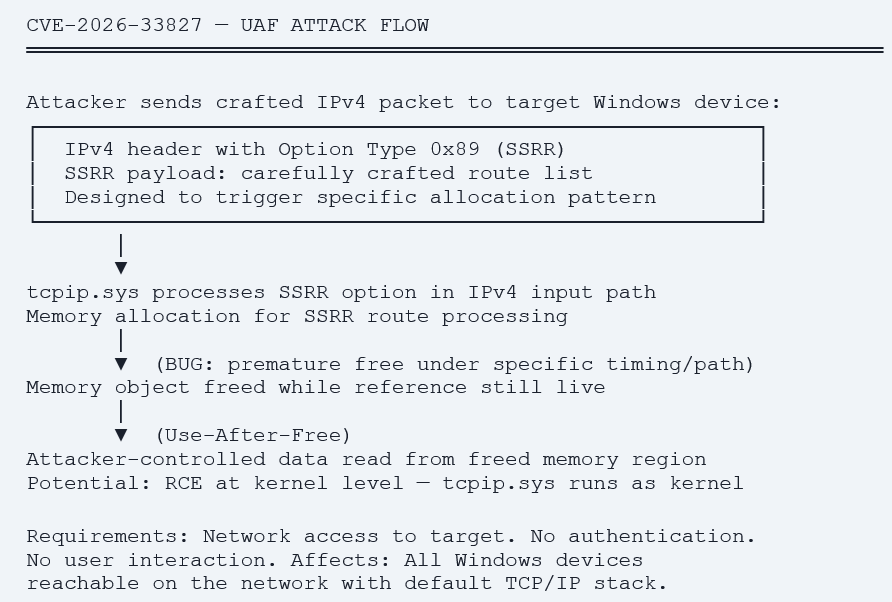
Microsoft’s MDASH discovered this via the Prove stage the system constructed crafted IPv4 packets carrying the SSRR option in specific configurations that triggered the UAF condition and confirmed exploitation was possible. This is a good example of why the Prove stage matters: many UAFs are theoretically present in code analysis but not practically exploitable. MDASH confirmed this one is.
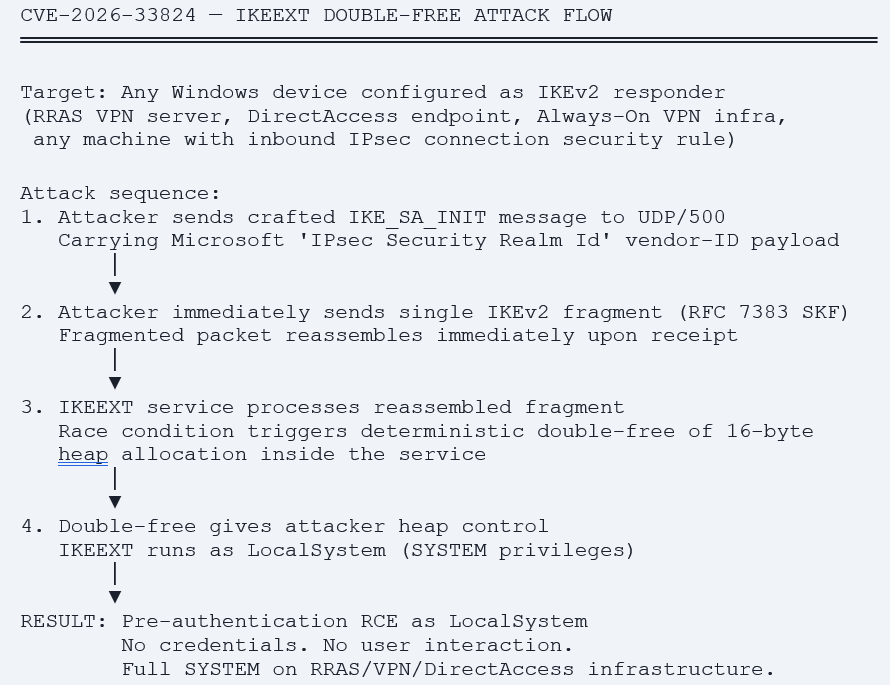
Deep Dive – CVE-2026-33824: ikeext.dll Unauthenticated IKEv2 Double-Free → LocalSystem RCE
The second Critical CVE is arguably the most dangerous from an enterprise perspective because of where it sits architecturally. IKEv2 (Internet Key Exchange version 2) is the protocol used to establish IPsec Security Associations, it is the foundation of Windows VPN connections, DirectAccess, Always-On VPN, and any machine with an inbound IPsec connection security rule. The IKEEXT service processes IKEv2 traffic and runs as LocalSystem the highest-privilege context on a Windows system.
Why ‘half-patched forests are not a defensible state’ for CVE-2026-41089
CVE-2026-41089 is a stack-based buffer overflow in Windows Netlogon, the protocol that authenticates users against domain controllers.
An unauthenticated attacker sends a specially crafted network request to a domain controller. No login, no prior access, no user interaction. Jason Kikta, CTO at Automox, stated: ‘Half-patched forests are not a defensible state for a pre-auth DC bug.
This means: if some domain controllers in your environment are patched and some are not, an attacker routes their request to the unpatched DC. The forest is only as secure as its least-patched domain controller.
Action: Patch ALL domain controllers in the same maintenance window. Do not stagger DC patching for this CVE. Additional mitigation: Restrict Netlogon traffic at the network layer. DCs do not need to accept Netlogon from arbitrary network segments.
CVE-2026-41096: DNS Client – Every Windows Device Is In Scope
The fourth Critical CVE affects the Windows DNS Client, the component that resolves hostnames on every Windows machine. The attack requires an attacker with the ability to influence DNS responses, a man-in-the-middle position on the network, a rogue DNS server, or a compromised DNS resolver to send a specially crafted DNS response that triggers remote code execution on the querying device.
The attack surface here is unusually large. Every Windows workstation, server, laptop, and VM that issues a DNS query, which is every managed device in a normal enterprise environment is in scope. Dustin Childs of Trend Micro’s Zero Day Initiative noted: ‘Any Windows host issuing a DNS query is potentially in scope, which includes every workstation sitting behind a compromised resolver.’
The practical implication: this CVE is particularly relevant in environments where split-tunnel VPNs, public Wi-Fi use, or hybrid remote work arrangements mean corporate devices are issuing DNS queries through untrusted resolvers. KB5089549 patches this on all supported Windows 11 versions.
The Intune Admin Response – Verifying KB5089549 Fleet-Wide
All 16 MDASH-discovered CVEs are patched in KB5089549 (Windows 11 24H2/25H2 — builds 26100.8457 / 26200.8457) and KB5087420 (Windows 11 23H2 — build 22631.7079). The moment today’s Patch Tuesday bulletin published, every attacker reading it knows exactly which build numbers to target on unpatched devices. The following Intune queries and policies verify and enforce patch deployment across your managed fleet.
Step 1 – Check Current Build Numbers Fleet-Wide via Device Query
// Find all managed Windows devices NOT on May 2026 patch level
DeviceInfo
| where OSPlatform == 'Windows'
| where OSVersion !in ('10.0.26200.8457',   // 25H2 patched
                       '10.0.26100.8457',   // 24H2 patched
                       '10.0.22631.7079')   // 23H2 patched
| project DeviceName, OSVersion, LastSeen, UserName
| order by LastSeen asc
// Every result = device missing May 2026 Patch Tuesday CVE patches
// Summary — count devices by patch status
DeviceInfo
| where OSPlatform == 'Windows'
| extend PatchStatus = iff(
    OSVersion in ('10.0.26200.8457','10.0.26100.8457','10.0.22631.7079'),
    'Patched', 'Unpatched')
| summarize Count=count() by PatchStatus
Step 2 – Identify High-Risk Unpatched Devices
Not all unpatched devices carry equal risk from today’s CVEs. Prioritise patching in this order based on the attack surface of the MDASH-discovered vulnerabilities:
| Priority | Device type | Reason |
| IMMEDIATE | Domain controllers | CVE-2026-41089: Unauthenticated Netlogon RCE. Patch ALL DCs in the same window. |
| IMMEDIATE | RRAS VPN, DirectAccess, Always-On VPN servers | CVE-2026-33824: Unauthenticated IKEv2 RCE as LocalSystem via UDP/500. |
| URGENT | All internet-facing Windows servers | CVE-2026-33827: tcpip.sys UAF reachable from network. Any device accepting TCP/IP traffic. |
| URGENT | Remote worker devices on untrusted networks | CVE-2026-41096: DNS Client RCE exploitable via rogue DNS on public Wi-Fi or compromised resolver. |
| STANDARD | All remaining managed Windows devices | Standard Patch Tuesday compliance. Target 100% within 5-day deadline. |
// Find VPN/RRAS servers not patched (CVE-2026-33824 priority)
DeviceInfo
| where OSVersion !in ('10.0.26200.8457','10.0.26100.8457','10.0.22631.7079')
| join kind=inner (DeviceProperties
    | where PropertyName == 'DeviceCategory'
    | where PropertyValue has_any ('Server','Domain Controller')) on DeviceId
| project DeviceName, OSVersion, PropertyValue, LastSeen
| order by PropertyValue asc
Step 3 – Expedite Deployment for Critical Devices
For devices that are not updating on schedule particularly domain controllers, VPN infrastructure, and internet-facing servers use Intune’s Expedite quality update feature to push KB5089549 immediately, bypassing the normal deferral period:
- Navigate: Devices → Update rings for Windows 10 and later → + Expedite update.
- Select update: May 2026 quality update.
- Assign: Create a dynamic device group capturing your highest-risk devices: domain controllers, VPN servers, internet-facing servers. Assign the expedite policy to this group.
Effect: Update deploys immediately, bypassing any configured deferral. Devices update on next check-in within 8 hours.
Step 4 – Verify via Autopatch Update Risk Visibility Report
The new Autopatch Update Risk Visibility report (released April 22, 2026) classifies every managed device as Current, Exposed, or Critical based on patch compliance. After today’s Patch Tuesday, any device not on the May build should be classified as Exposed or Critical.
- Navigate: Reports → Windows updates → Autopatch update risk visibility.
- Review: Critical devices — these are your priority remediation targets for today’s CVEs.
- Export: Export the Critical and Exposed lists and cross-reference with your device role inventory.
Step 5 – Defender Advanced Hunting – Detect Exploit Attempts
With four Critical unauthenticated RCE CVEs now publicly known, set up hunting queries to detect potential exploitation attempts targeting unpatched devices:
// Detect anomalous IKEv2 traffic targeting IKEext (CVE-2026-33824)
DeviceNetworkEvents
| where RemotePort == 500 or LocalPort == 500  // IKEv2 default port
| where ActionType == 'InboundConnectionAccepted'
| where Timestamp >= now(-24h)
| join kind=leftouter (DeviceInfo
    | project DeviceId, OSVersion) on DeviceId
| where OSVersion !in ('10.0.26200.8457','10.0.26100.8457','10.0.22631.7079')
| summarize Count=count() by DeviceName, RemoteIP, OSVersion
| order by Count desc
// Detect DNS responses from non-corporate resolvers (CVE-2026-41096)
DeviceNetworkEvents
| where RemotePort == 53 or LocalPort == 53
| where ActionType == 'InboundConnectionAccepted'
| where Timestamp >= now(-24h)
// Filter for DNS traffic from unexpected source IPs
| where RemoteIP !startswith '10.'  // adjust for your internal DNS range
| where RemoteIP !startswith '192.168.'
| summarize Count=count() by DeviceName, RemoteIP
| order by Count desc
What MDASH Means for Enterprise Security – The Bigger Picture
MDASH is not just interesting because of the 16 CVEs it found today. It is interesting because of what it signals about the trajectory of vulnerability management as a discipline. Understanding this shift is relevant for every enterprise IT and security team.
The Old Model vs the New Model
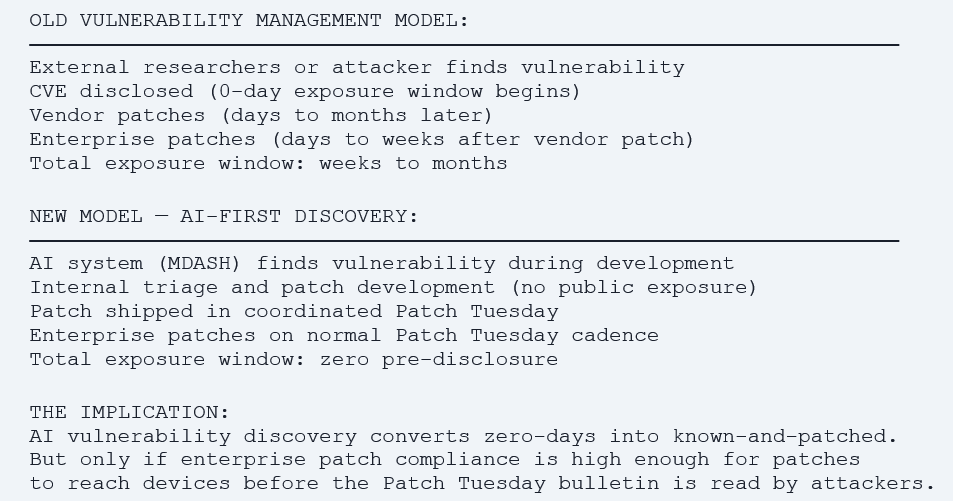
The Patch Compliance Imperative
The MDASH model creates a positive dynamic: vulnerabilities are found internally and patched before external disclosure. But this advantage only translates to enterprise protection if managed devices receive the patch quickly after Patch Tuesday. A device that sits unpatched for 14 days after today’s bulletin has been a target for 14 days for a pre-authentication RCE in tcpip.sys that is reachable from the network.
This is why the Intune controls covered in this guide compliance deadlines, expedite deployment, Autopatch risk visibility are not just administrative best practices. They are the direct translation of Microsoft’s AI-powered internal security research into actual endpoint protection. MDASH finds the bugs. Patch Tuesday ships the fixes. Intune ensures every managed device receives them.
Microsoft’s own estimate from the Hotpatch announcement is relevant here: with hotpatch enabled and compliance deadlines configured, organisations reach 90% patch compliance in half the time compared to the traditional restart-required update model. For Critical RCEs in core network stack components, that time difference is the difference between protected and exploitable.
The Preview Programme – What to Expect
Microsoft is offering a limited private preview of MDASH for enterprise customers. The sign-up link is https://aka.ms/AI-drivenScanningHarness. At this stage the preview is described as for ‘a small set of customers’ and is customer-facing in a narrow sense — the primary use case is Microsoft using MDASH against its own codebase, with the preview giving select customers visibility into the capabilities and findings pipeline.
The longer-term trajectory an enterprise-accessible AI vulnerability scanning capability for customer code is implied but not yet productised. Microsoft’s stated strategic intent is clear: ‘The future belongs to security teams that can find, validate, contain, and fix in one governed motion.’
Action Checklist – Intune Admins: May 2026 Patch Tuesday
IMMEDIATE – Today
- Run Device Query: find all managed Windows devices NOT on builds 26200.8457 / 26100.8457 / 22631.7079.
- Identify domain controllers in the unpatched list patch ALL in the same maintenance window (CVE-2026-41089).
- Identify RRAS VPN, DirectAccess, Always-On VPN infrastructure in the unpatched list (CVE-2026-33824).
- Deploy Expedite update policy to domain controllers and VPN infrastructure immediately.
- Set up Defender Advanced Hunting query for anomalous IKEv2 traffic to UDP/500 on unpatched devices.
URGENT – This Week
- Review Autopatch Update Risk Visibility report target zero Critical-classified devices by end of week.
- Deploy Expedite update to all internet-facing Windows servers (CVE-2026-33827 tcpip.sys UAF).
- Review compliance deadline settings confirm Deadline for quality updates is 5 days or fewer in all Update rings.
- Add DNS Client hunt query to regular Advanced Hunting schedule for next 30 days (CVE-2026-41096).
STANDARD – Within 5 Days
- Verify remaining managed Windows devices reach patched build numbers within compliance deadline.
- Review compliance reports for any devices in non-compliant state identify and remediate blockers.
- Sign up for MDASH preview if you want early visibility into future Windows vulnerability research: aka.ms/AI-drivenScanningHarness
References
| Resource | URL |
| Microsoft MDASH announcement – May 12, 2026 | https://www.microsoft.com/en-us/security/blog/2026/05/12/defense-at-ai-speed-microsofts-new-multi-model-agentic-security-system-tops-leading-industry-benchmark/ |
| May 2026 Patch Tuesday – KB5089549 | https://support.microsoft.com/en-us/topic/may-12-2026-kb5089549-os-builds-26200-8457-and-26100-8457 |
| MSRC May 2026 Security Updates | https://msrc.microsoft.com/update-guide/releaseNote/2026-May |
| CVE-2026-33827 – tcpip.sys UAF | https://msrc.microsoft.com/update-guide/en-US/vulnerability/CVE-2026-33827 |
| CVE-2026-33824 – IKEv2 double-free RCE | https://msrc.microsoft.com/update-guide/en-US/vulnerability/CVE-2026-33824 |
| CVE-2026-41089 – Netlogon RCE | https://msrc.microsoft.com/update-guide/en-US/vulnerability/CVE-2026-41089 |
| CVE-2026-41096 – DNS Client RCE | https://msrc.microsoft.com/update-guide/en-US/vulnerability/CVE-2026-41096 |
| MDASH preview sign-up | https://aka.ms/AI-drivenScanningHarness |
| Intune Expedite quality update deployment | https://learn.microsoft.com/en-us/intune/protect/windows-10-expedite-updates |
| Autopatch update risk visibility report | https://aka.ms/ReassessProtect |