Hunting unregistered TDI transports with Intune before they reach your broad ring.
Microsoft shipped a record 570 CVE fixes on 14 July 2026. Every blog on earth is busy counting them. The change that will actually break your fleet is not a CVE at all, it is four lines under Networking in the changelog, and it is the kind of thing you find out about when a client’s VPN stops working and nobody can say why.
- Windows security updates released on or after 14 July 2026 enforce TDI transport registration. Sockets using an unregistered third-party TDI transport stop working.
- Blast radius: legacy VPN clients, older AV/EDR network filters, industrial and line-of-business software that hooks the network stack. Registered transports are unaffected.
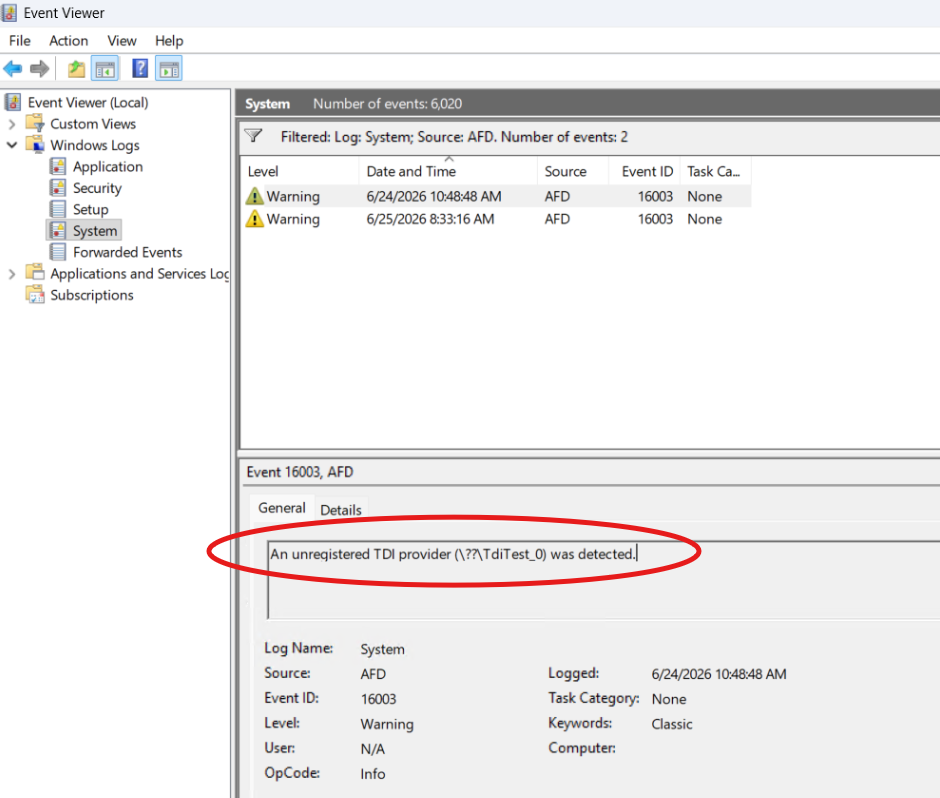
- Your detection signal is AFD Event ID 16003 in the System log and it only fires once per restart cycle. A one-shot manual check will miss it.
- The escape hatch is AfdTdiUnknownProviderValidationLevel. Microsoft’s guidance is to stay at 2 or above. Most posts will tell you to set it to 0. Do not.
- The trap nobody has written about: the event does not exist until you patch. You cannot inventory this in advance. Your pilot ring is now your sensor.
What actually changed
On 14 July 2026 Microsoft published KB5106257: “Third-party TDI transports might stop working after installing Windows security updates released on or after July 14, 2026.” The behaviour is deliberate. In Microsoft’s own framing, an untrusted TDI transport is a constant source of security vulnerability, so they introduced an intentional hardening change requiring that every TDI transport used as a socket transport must register with the TDI interface. Any transport that does not register becomes unusable as a socket transport.
The sharp edge is in the “what is not affected” section, and it is worth reading twice, the TDI documentation has always stated that every TDI transport must register. Microsoft simply never enforced it. Registered transports are fine. What is breaking today is software that has been out of spec for roughly two decades and got away with it because Windows did not check.
THE POINT.
This is not a bug and it is not going to be reverted. It is an unenforced rule finally being enforced. Any vendor whose driver breaks has been non-compliant since the documentation was written. That framing matters when you open the support ticket.
A 30-second history of TDI, because it explains everything
The Transport Driver Interface is the old kernel-mode interface that sat between higher-level network components and the transport stack. Microsoft deprecated it a very long time ago and told everyone to move to Winsock Kernel (WSK). Most people did.
The ones who did not are exactly the categories you would expect, and exactly the categories that hurt when they fail:
- Legacy VPN clients that insert themselves into the network path
- Older AV and EDR products with network filter components
- Industrial, medical, SCADA and lab software with vendor-supplied network shims
- Bespoke or in-house line-of-business tools nobody has recompiled since a previous decade
- Network accelerators, DLP agents, and “security” middleware that hooks sockets
Notice the pattern: every item on that list is something that, when it breaks, produces the symptom “the network is broken” rather than “product X is broken”. That is why this will burn hours. Your service desk will chase DNS, Wi-Fi, and the firewall long before anyone opens Event Viewer.
Who is in scope
KB5106257 applies to a genuinely enormous surface. This is not a Windows 11 story:
| Family | Versions listed in KB5106257 |
| Windows 11 | 23H2, 24H2, 25H2, 26H1 – all editions |
| Windows 10 | version 1607 (all editions), version 1809 (all editions), Windows 10 ESU |
| Windows 10 LTSB/LTSC | Enterprise LTSB 2016, IoT Enterprise LTSB 2016, Enterprise LTSC 2019, IoT Enterprise LTSC 2019, Enterprise LTSC 2021, IoT Enterprise LTSC 2021 |
| Windows Server | 2016, 2019, 2022, version 23H2, 2025 |
READ THE LTSC ROW AGAIN.
IoT Enterprise LTSC and Server are on that list. That is your manufacturing floor, your imaging modality, your kiosk estate, your jump boxes, the exact population running vendor software that has not been touched in years, maintained by people who patch on a quarterly cadence and will hit this in one shot with no pilot. If you manage OT or IoT LTSC for a client, this is your highest-risk group by a distance.
The updates carrying the change
| KB | Applies to | Build after install |
| KB5101650 | Windows 11 25H2 / 24H2 | 26200.8875 / 26100.8875 |
| KB5099414 | Windows 11 23H2 | 22631.7376 |
| KB5099539 | Windows 10 21H2 / 22H2 (ESU + LTSC) | 19045.7548 / 19044.7548 |
All three carry identical [Networking] text: a security hardening change that enforces TDI transport registration requirements, with applications using sockets over unregistered third-party TDI transports possibly ceasing to work after install. And note the wording in the KB title “released on or after July 14, 2026”. This is not a one-month problem you can wait out. Every future security update carries it. There is no version of this where you skip it.
The trap: you cannot inventory this before you patch
Here is the part that changes your whole approach, and the reason most of the advice you will read this week is useless.
The AFD 16003 event is generated by the new AFD enforcement code. It ships in the update. An unpatched device has no idea it has an unregistered TDI transport and will never tell you. So the instinct “let me scan the fleet for affected drivers before rollout” has nowhere to run.
THE REFRAME.
You cannot survey your way out of this. Your pilot ring stops being a validation gate and becomes a detection instrument. The only way to find out which of your devices have unregistered TDI transports is to patch a carefully chosen population and read what they tell you. Choose that population like it is a sampling exercise, because it is.
Which means your pilot ring is probably wrong
Most pilot rings are built for convenience: IT staff, a few volunteers, whoever complains least. That ring is worthless here, because IT laptops run the cleanest software stack in the company. You need a ring built for coverage, not for comfort.
Build the pilot to include at least one device from each of these, per tenant:
- Every distinct VPN client in the estate including the one client X refuses to retire
- Every distinct AV/EDR product, including anything left behind from a migration
- Each LTSC / IoT LTSC image, which by definition nobody has tested
- Every OT, lab, or clinical workstation build with vendor network software
- At least one server per role that carries third-party network filtering
- The oldest surviving line-of-business app image you still support
And crucially pair that ring with validation level 1 (LogUnregistered), which is covered in section 4. Level 1 makes the pilot log the problem without blocking it. You get the inventory without breaking a pilot user’s VPN on a Tuesday morning. That single move is the difference between a controlled discovery exercise and a P1.
Detection
The manual check, and why it lies to you
Microsoft’s instruction is simple: open Event Viewer > Windows > System and look for AFD Event ID 16003, “An unregistered TDI provider (\Driver\<Name>) was detected”. If it is there, you are affected.
Then comes the line that everyone will skim past, and it is the most operationally important sentence in the whole KB: only one event is logged per restart cycle.
Think about what that does to you in the field:
- A device with three unregistered transports may only ever tell you about one of them per boot
- A device that has not rebooted since before the update tells you nothing at all
- A busy System log will roll the event out of retention on chatty servers
- Check on Monday, miss it, and the evidence is gone by the time the user calls on Thursday
DESIGN CONSEQUENCE.
One event per boot means point-in-time checking is structurally unreliable. You need something that runs repeatedly, over a wide lookback, and writes its findings somewhere durable. That is a Remediation, not a script run and not a “have a look in Event Viewer” ticket note.
Intune Remediation – detection script
This is the fleet-wide sensor. It reads the System log over a 30-day window, filters on message text rather than trusting the event ID alone, extracts the driver name, and reports it alongside the device’s current enforcement level so one report column tells you both the finding and the posture.
Detect-UnregisteredTdiProviders.ps1
<#
.SYNOPSIS
    Intune Remediation - DETECTION
    Finds unregistered TDI providers blocked by the July 2026 AFD hardening change.
.NOTES
    Ref     : KB5106257
    Exit 0  = compliant   (no unregistered TDI provider observed)
    Exit 1  = NON-compliant (unregistered TDI provider detected -> triage)
    Context : Run as SYSTEM. 64-bit. Signature check: No.
#>

$ErrorActionPreference = 'Stop'

# AFD logs ONE event per restart cycle, so keep the window generous.
$LookbackDays = 30
$EventId      = 16003
$LogName      = 'System'

try {
    $events = Get-WinEvent -FilterHashtable @{
        LogName   = $LogName
        Id        = $EventId
        StartTime = (Get-Date).AddDays(-$LookbackDays)
    } -ErrorAction Stop
}
catch [Exception] {
    # "No events were found" is a terminating error in Get-WinEvent. Treat as clean.
    if ($_.Exception.Message -match 'No events were found') {
        Write-Output 'OK: No AFD 16003 events in the lookback window.'
        exit 0
    }
    Write-Output "ERROR: $($_.Exception.Message)"
    exit 0   # fail open - do not flag a device on a log-read failure
}

# Event ID 16003 is not unique to AFD across every provider. Confirm on message text.
$tdiEvents = $events | Where-Object { $_.Message -match 'unregistered TDI provider' }

if (-not $tdiEvents) {
    Write-Output 'OK: No unregistered TDI provider events.'
    exit 0
}

# Pull the driver name out of "(\Driver\<Name>)"
$drivers = New-Object System.Collections.Generic.List[string]
foreach ($e in $tdiEvents) {
    if ($e.Message -match '\\Driver\\([^\s\)\]]+)') {
        $drivers.Add($Matches[1])
    }
    else {
        $drivers.Add('UNPARSED')
    }
}

$unique = $drivers | Sort-Object -Unique
$first  = ($tdiEvents | Sort-Object TimeCreated | Select-Object -First 1).TimeCreated

# Current enforcement level, so the report tells you posture AND finding in one column.
$afdParams = @{
    Path        = 'HKLM:\SYSTEM\CurrentControlSet\Services\AFD\Parameters'
    Name        = 'AfdTdiUnknownProviderValidationLevel'
    ErrorAction = 'SilentlyContinue'
}
$lvl = (Get-ItemProperty @afdParams).AfdTdiUnknownProviderValidationLevel
if ($null -eq $lvl) { $lvl = '2 (default, not explicitly set)' }

Write-Output ("TDI_UNREGISTERED | Level=$lvl | FirstSeen=$first | Drivers=" + ($unique -join ','))
exit 1
Why it is written that way
- Message-text filtering. Event ID 16003 is not globally unique across providers. Filtering on ID alone will eventually give you a false positive from an unrelated source. The Where-Object on “unregistered TDI provider” is what makes it trustworthy.
- Provider name is deliberately not hard-coded. It is tempting to add ProviderName=’Microsoft-Windows-AFD’ to the filter hashtable. Verify the exact provider string in your own environment before you do if it is wrong, the filter silently returns nothing and your fleet reports 100% clean. A detection that fails closed and lies to you is worse than no detection. LogName + ID + message match is slower and correct.
- Fail open, not closed. On a log-read failure the script exits 0. You do not want a corrupt event log on one device generating a false “affected” flag that sends someone hunting a driver that does not exist.
- The 30-day lookback exists because of the one-event-per-boot rule. A 24-hour window would miss most of your estate.
- Reporting the level in the same output line. When you triage 400 flagged devices, “is this device blocking or just logging?” is the first question. Answer it in the column.
Intune Remediation – remediation script
The remediation script does something that will look wrong at first glance: it does not fix anything. It records evidence.
There is a real temptation to have the remediation drop the validation level and make the symptom go away. Resist it. Automatically weakening a security control across a fleet, on the strength of a single event log entry, converts a compatibility problem into an incident and does it silently, at scale, with your name on it. The remediation writes a durable breadcrumb that survives log rollover, so you keep the inventory even after the event ages out.
Remediate-RecordTdiEvidence.ps1
<#
.SYNOPSIS
    Intune Remediation - REMEDIATION
    Records durable evidence of unregistered TDI providers.
.DESCRIPTION
    This script DOES NOT lower AfdTdiUnknownProviderValidationLevel.
    Weakening a security control automatically, fleet-wide, on the strength of
    one event log entry is how you turn a compatibility problem into an incident.
    It writes a breadcrumb that survives System log rollover so you keep the
    inventory even after the event ages out.
.NOTES
    Ref     : KB5106257
    Context : Run as SYSTEM. 64-bit. Signature check: No.
#>

$ErrorActionPreference = 'Stop'
$BreadcrumbKey = 'HKLM:\SOFTWARE\Scudra\TDIAudit'
$LookbackDays  = 30

try {
    $events = Get-WinEvent -FilterHashtable @{
        LogName   = 'System'
        Id        = 16003
        StartTime = (Get-Date).AddDays(-$LookbackDays)
    } -ErrorAction Stop | Where-Object { $_.Message -match 'unregistered TDI provider' }
}
catch {
    Write-Output 'Nothing to record.'
    exit 0
}

if (-not $events) { Write-Output 'Nothing to record.'; exit 0 }

$drivers = foreach ($e in $events) {
    if ($e.Message -match '\\Driver\\([^\s\)\]]+)') { $Matches[1] }
}
$drivers = @($drivers | Sort-Object -Unique)

if (-not (Test-Path $BreadcrumbKey)) {
    New-Item -Path $BreadcrumbKey -Force | Out-Null
}

# Merge with anything we recorded on a previous run - never overwrite history.
$prior = (Get-ItemProperty -Path $BreadcrumbKey -Name 'Drivers' -ErrorAction SilentlyContinue).Drivers
if ($prior) { $drivers = @($drivers + ($prior -split ',')) | Sort-Object -Unique }

New-ItemProperty -Path $BreadcrumbKey -Name 'Drivers'      -Value ($drivers -join ',') -PropertyType String -Force | Out-Null
New-ItemProperty -Path $BreadcrumbKey -Name 'LastDetected' -Value (Get-Date -Format 'o')  -PropertyType String -Force | Out-Null
New-ItemProperty -Path $BreadcrumbKey -Name 'OSBuild'      -Value ([System.Environment]::OSVersion.Version.ToString()) -PropertyType String -Force | Out-Null

Write-Output ('Recorded: ' + ($drivers -join ','))
exit 0
THE BREADCRUMB IS THE POINT.
The System log will roll. The event fires once per boot. Without a durable record, your inventory decays every single day. This key is what lets you answer “which devices, which drivers, since when” three weeks from now when the client asks instead of re-running the whole exercise.
Advanced Hunting
Remediations give you per-device truth. KQL gives you the cross-tenant picture, which is what you actually need in a CSP/GDAP world where the question is never “is this device affected” but “how exposed is this client, and which client do I call first”.
Who weakened the control?
// Who lowered AFD TDI validation, where, and with what?
// Your exception list should match this result set exactly. If it doesn't,
// someone fixed a ticket by weakening a security control.
DeviceRegistryEvents
| where Timestamp > ago(30d)
| where RegistryKey has @"\SYSTEM\CurrentControlSet\Services\AFD\Parameters"
| where RegistryValueName == "AfdTdiUnknownProviderValidationLevel"
| extend Level = tostring(RegistryValueData)
| project Timestamp, DeviceName, ActionType, Level,
          InitiatingProcessFileName, InitiatingProcessCommandLine,
          InitiatingProcessAccountName
| sort by Timestamp desc
This is the query that matters most six weeks from now. Every exception you grant in section 5 should appear here and nowhere else. If a device shows up in this result set and not on your exception list, someone closed a ticket by turning off a security control which is the exact behavior this whole hardening change exists to stop.
How much of the fleet can even report yet?
// Which devices are actually patched to the enforcing build?
// TDI enforcement only exists after the July 2026 security update, so this
// tells you how much of the fleet is even capable of reporting the problem.
DeviceInfo
| where Timestamp > ago(1d)
| summarize arg_max(Timestamp, *) by DeviceId
| extend Build = tostring(OSBuild)
| summarize Devices = dcount(DeviceId) by OSPlatform, OSVersion, Build
| sort by Devices desc
Optional: correlate a driver name back to a product
// Optional: correlate a driver name harvested from AFD 16003 back to a product.
// Replace <DriverName> with the value your remediation report surfaced.
// Note: DriverLoad telemetry coverage varies by platform/version - if this
// returns nothing, fall back to the local sc.exe / driverquery step in the post.
DeviceEvents
| where Timestamp > ago(30d)
| where ActionType == "DriverLoad"
| where FileName has "<DriverName>"
| project Timestamp, DeviceName, FileName, FolderPath, InitiatingProcessFileName
| sort by Timestamp desc
Local triage: from driver name to vendor
The event gives you \Driver\<Name>. That is a service name, not a product name, and it is frequently something unhelpful like a six-character abbreviation. Run this on a flagged device to turn it into something you can put in a vendor ticket.
Get-TdiDriverOwner.ps1
# Map an unregistered TDI driver name back to a real product.
# Run locally on a device the remediation report flagged.

$name = 'REPLACE_ME'   # e.g. the value from (\Driver\<Name>)

# 1. Service / driver registration
Get-CimInstance Win32_SystemDriver |
    Where-Object { $_.Name -like "*$name*" } |
    Select-Object Name, DisplayName, State, StartMode, PathName |
    Format-List

# 2. Who signed the binary? This is the vendor you are about to email.
$svc = Get-ItemProperty "HKLM:\SYSTEM\CurrentControlSet\Services\$name" -ErrorAction SilentlyContinue
if ($svc.ImagePath) {
    $path = $svc.ImagePath -replace '^\\\?\?\\', '' -replace '^system32', "$env:SystemRoot\system32"
    Get-AuthenticodeSignature $path | Select-Object Status, @{n='Signer';e={$_.SignerCertificate.Subject}}
    (Get-Item $path).VersionInfo | Select-Object CompanyName, FileDescription, FileVersion
}

# 3. Confirm the AFD event on this box
Get-WinEvent -FilterHashtable @{LogName='System'; Id=16003} -MaxEvents 10 |
    Select-Object TimeCreated, Message | Format-List
The Authenticode signer is the single most valuable field here. The driver name might be npf or tdx2 or something equally opaque, but the certificate subject tells you exactly which company to email and gives you the leverage to say “your driver has never met the registration requirement in the TDI specification”.
The control: AfdTdiUnknownProviderValidationLevel
This is the only lever Microsoft gives you, and understanding all four values not just the two everyone will blog about is what separates a considered rollout from a panic.
| Item | Value |
| Registry location | HKEY_LOCAL_MACHINE\SYSTEM\CurrentControlSet\Services\AFD\Parameters |
| Value name | AfdTdiUnknownProviderValidationLevel |
| Value type | REG_DWORD |
| Level | Name | Behaviour | Use it when |
| 0 | Ignore | Validation completely disabled. No logging, no blocking. | Almost never. You lose the telemetry as well as the protection you cannot even see what you are exposed to. |
| 1 | LogUnregistered | Validation disabled, but logs any unregistered TDI provider. | Pilot ring discovery, and time-boxed exceptions while a vendor ships a fix. This is your workhorse. |
| 2 | BlockUnregistered | Logs and blocks unregistered TDI providers. This is the default. | Everywhere, eventually. This is where the fleet lives. |
| 3 | Block | Logs and blocks every TDI provider registered ones included. | Hardened, known-good estates. See below, this one is interesting. |
MICROSOFT’S EXPLICIT WARNING.
Lowering the validation to either 0 (Ignore) or 1 (LogUnregistered) provides best-effort protection but still leaves your system vulnerable. The recommendation is to keep the validation level at or above 2 (BlockUnregistered) and to update or replace any affected third-party TDI transports with versions that properly register with the TDI interface. Levels 0 and 1 are a bridge, not a destination. Quote this line to anyone who asks you to “just turn it off”.
Level 3 is the one nobody will tell you about
Every roundup this week will cover 0, 1 and 2. Level 3 blocks every TDI provider including properly registered ones. Read that as what it is: Microsoft has quietly handed you a switch to turn off the entire legacy TDI surface on a machine.
For most of your estate that is too aggressive. But think about where it fits perfectly:
- Shared PC and kiosk fleets, where the software inventory is small, fixed, and known
- Autopilot self-deploying devices with a locked application set
- Frontline and single-purpose devices
- Any build where you can enumerate every network component and none of them are from 2007
- New cloud-native builds where nothing legacy has ever been installed
On a Shared PC build running a browser, Teams, and one LOB app, there is no legitimate TDI consumer. Setting level 3 there removes an attack surface you were never using. That is a genuine hardening win available today, for free, and it is sitting in a KB that everyone is reading as a compatibility warning. Test it properly first and be aware you are moving beyond Microsoft’s stated recommendation of “2 or above”, which means you own the validation.
Deploying the setting with Intune
There is no CSP. Stop looking.
Before you spend an hour in the Settings Catalog: there is no CSP for this. It is a raw registry value under a service key. The Policy CSP does not expose it, and custom OMA-URI profiles can only address CSPs, they are not a generic registry-write mechanism, no matter how many forum posts imply otherwise.
Your real options, ranked:
| Option | Verdict | Why |
| Intune Remediation | Recommended | Recurs on a schedule, self-heals drift, and critically gives you a per-device report column. The reporting is the entire value here. |
| Platform script (PowerShell) | No | Runs once, does not recur, no meaningful reporting, and will not re-apply after an image refresh or a technician “fixing” it locally. |
| Win32 app | Situational | Works if you need install/uninstall semantics or want it tied to an app’s presence. Heavier than it needs to be for one DWORD. |
| Group Policy Preferences | For hybrid only | Fine if the device is domain-joined and you already have GPP plumbing. Do not build new GPO dependencies for a cloud-managed fleet. |
| Configuration Profile / Settings Catalog | Not possible | No CSP exists. This is the hour you are about to waste if you skip this table. |
Audit-mode script for the pilot ring
Assign this to a narrow, named pilot group. Never to All Devices. It drops the pilot to level 1 so the devices log without blocking, and it stamps an expiry date so the exception cannot quietly become permanent which it will, otherwise, because they always do.
Set-AfdAuditMode.ps1 – PILOT ONLY
<#
.SYNOPSIS
    PILOT RING ONLY - drop AFD validation to LogUnregistered (1).
.DESCRIPTION
    Level 1 logs the unregistered provider but does NOT block it. That buys you a
    complete inventory without breaking the pilot user's VPN on a Tuesday morning.
    Assign this to a NARROW, NAMED pilot group. Never to All Devices.
    Pair it with a hard expiry - see Set-AfdEnforce.ps1 to put it back.
.NOTES
    Ref : KB5106257  |  Context: SYSTEM, 64-bit
#>

$Key = 'HKLM:\SYSTEM\CurrentControlSet\Services\AFD\Parameters'

if (-not (Test-Path $Key)) { New-Item -Path $Key -Force | Out-Null }

$set = @{
    Path         = $Key
    Name         = 'AfdTdiUnknownProviderValidationLevel'
    Value        = 1
    PropertyType = 'DWord'
    Force        = $true
}
New-ItemProperty @set | Out-Null

# Stamp an expiry so the exception cannot quietly become permanent.
$expiryKey = 'HKLM:\SOFTWARE\Scudra\TDIAudit'
if (-not (Test-Path $expiryKey)) { New-Item -Path $expiryKey -Force | Out-Null }
$stamp = @{
    Path         = $expiryKey
    Name         = 'AuditModeExpires'
    Value        = (Get-Date).AddDays(14).ToString('o')
    PropertyType = 'String'
    Force        = $true
}
New-ItemProperty @stamp | Out-Null

Write-Output 'AFD validation set to 1 (LogUnregistered). Reboot required. Expires in 14 days.'
exit 0
REBOOT.
This is a driver-level parameter under a service key. Treat a reboot as required for the change to take effect, and build that into your pilot comms. A pilot device that has not rebooted is a pilot device that is telling you nothing.
The drift-control pair – the one you will still be running next year
Once the pilot is done, this pair is what keeps the estate honest. It flags any device where someone has lowered the control below the default and puts it back. Exclude your documented exception group from the assignment from the assignment, not from your memory.
Detect-AfdEnforcementDrift.ps1
<#
.SYNOPSIS
    Intune Remediation - DETECTION (drift control)
    Flags any device where AFD TDI validation has been lowered below the default of 2.
.NOTES
    Ref : KB5106257
    Exit 0 = at or above 2 (or unset, which means default 2)
    Exit 1 = weakened -> remediate
#>

$Key = 'HKLM:\SYSTEM\CurrentControlSet\Services\AFD\Parameters'
$q = @{ Path = $Key; Name = 'AfdTdiUnknownProviderValidationLevel'; ErrorAction = 'SilentlyContinue' }
$val = (Get-ItemProperty @q).AfdTdiUnknownProviderValidationLevel

# Not present = Windows default = 2 (BlockUnregistered). Compliant.
if ($null -eq $val) { Write-Output 'OK: not set (default 2).'; exit 0 }

if ([int]$val -lt 2) {
    Write-Output "WEAKENED: AfdTdiUnknownProviderValidationLevel = $val"
    exit 1
}

Write-Output "OK: AfdTdiUnknownProviderValidationLevel = $val"
exit 0
Remediate-AfdEnforce.ps1
<#
.SYNOPSIS
    Intune Remediation - REMEDIATION (drift control)
    Returns AFD TDI validation to the Windows default of 2 (BlockUnregistered).
.DESCRIPTION
    This is the script that ends your pilot. Exclude your documented, time-boxed
    exception group from the assignment - not from your memory.
.NOTES
    Ref : KB5106257  |  Context: SYSTEM, 64-bit  |  Reboot required
#>

$Key = 'HKLM:\SYSTEM\CurrentControlSet\Services\AFD\Parameters'
if (-not (Test-Path $Key)) { New-Item -Path $Key -Force | Out-Null }

$set = @{
    Path         = $Key
    Name         = 'AfdTdiUnknownProviderValidationLevel'
    Value        = 2
    PropertyType = 'DWord'
    Force        = $true
}
New-ItemProperty @set | Out-Null

Write-Output 'AFD validation restored to 2 (BlockUnregistered). Reboot required.'
exit 0
Note the detection logic on the unset case. If the value is absent, Windows uses the default of 2, which is compliant. A naive script that flags “value not present” as non-compliant will light up your entire fleet on day one and destroy the report’s signal-to-noise before you have found a single real problem. Absent is compliant.
The rollout plan
Five phases. The sequencing matters more than any individual step, because the constraint from section 2, you cannot see the problem until you patch forces the order.
Phase 0 – Accept that you are already exposed
- The update is out. Any device that auto-updated today is already enforcing at level 2.
- Do not mass-defer. Deferral is not a strategy when the change ships in every subsequent security update, and you would be trading a known compatibility risk for two exploited zero-days.
- Pull your update ring config now and know exactly which populations get the patch, when.
Phase 1 – Build a pilot for coverage, not convenience
- Assemble the ring from section 2: every distinct VPN client, AV/EDR, LTSC image, OT build, server role.
- Deploy Set-AfdAuditMode.ps1 (level 1) to that ring only.
- Deploy the detection/evidence Remediation pair to the ring. Daily schedule.
- Patch the ring. Reboot it. Wait a full working week, the one-event-per-boot rule means you need boot cycles, not hours.
Phase 2 – Harvest and triage
- Read the Remediation report. Every distinct driver name is a work item.
- Run the local triage script on one device per driver. Get the Authenticode signer.
- Open vendor tickets. Use the language from section 1: the registration requirement is in the TDI specification and always has been. This is not a Microsoft regression and you should not let a vendor tell your client that it is.
- Build the driver → vendor → fixed-version table. That table is your status report for the next month.
Phase 3 — Remove, replace, or except
- Remove: is the offending product still needed? A surprising number of these are migration leftovers nobody has uninstalled. Deleting the agent is the best fix available.
- Replace: vendor has a compliant version. Package it, ship it, verify the event stops.
- Except: no fix exists yet and the business cannot lose the app. Grant level 1 not 0 to a named group, with an expiry date, a ticket reference, and a named owner. Level 1 keeps the logging so you can prove the exception is still needed.
Phase 4 – Enforce and hold the line
- Revert the pilot to level 2 with Remediate-AfdEnforce.ps1.
- Deploy the drift-control Remediation pair to All Devices, excluding the exception group.
- Run the KQL weekly. Exception group and query results should match exactly.
- Review the exception group monthly and let the expiry dates do their job. An exception without an expiry is a permanent hole with better paperwork.
THE CSP / MSP ANGLE.
If you run managed services across multiple tenants, do this once and template it. The Remediation pair, the exception group naming standard, and the KQL are all tenant-agnostic. Build them once, deploy through your GDAP relationships, and you have fleet-wide TDI visibility across every client before most organisations have finished reading the changelog. The client with the 2015-era VPN concentrator is the one who will remember which vendor called them first.
If it is already broken: the triage runbook
A user calls. “The internet is broken.” They patched last night. Here is the order of operations that gets you to an answer in ten minutes instead of a morning.
| # | Step | What it tells you |
| 1 | Confirm the build. Did this device install KB5101650 / KB5099414 / KB5099539? | If not, TDI is not your culprit. Stop and look elsewhere. |
| 2 | Check the symptom shape: does one app fail while the browser works? | Selective failure is the TDI signature. Total network loss usually is not AFD only blocks the unregistered transport, not the stack. |
| 3 | Run the local triage script. Look for AFD 16003. | Present = confirmed. Absent = check whether the device has rebooted since the patch; the event fires at boot. |
| 4 | Extract the driver name, get the signer. | Names the product and the vendor. This is your ticket. |
| 5 | Set level 1 on that device, reboot, retest. | If the app returns, you have a definitive root cause and a documented workaround in one move. |
| 6 | Log the exception properly. Group, owner, expiry, ticket. | This is the step everyone skips, and it is why estates rot. |
| 7 | Escalate to the vendor with the signer and the spec citation. | Do not let “wait for Microsoft to fix it” become the plan. Microsoft is not fixing this. |
WHAT NOT TO DO.
Do not uninstall the July update. You would be removing fixes for two zero-days that are being actively exploited in the wild, an AD FS elevation of privilege flaw and a SharePoint privilege escalation flaw, both of which CISA has added to its Known Exploited Vulnerabilities catalog with deadlines this month. Trading a broken legacy VPN client for an exploitable AD FS server is not a trade. Level 1 on the affected device is the correct workaround; rollback is not.
Also in this update: your second dead clock
While you are in this changelog, there is a second item that is going to catch people, and nobody is writing about it either. Under Remote Desktop (RDP) Security in the same KBs: support for SHA-2 certificate thumbprints has been added for trusted RDP publishers, with SHA-1 support retained only for backward compatibility and planned for future removal. There is also new guidance for managing RDP file security through Group Policy, aimed at reducing phishing risk by controlling which .rdp files users can open.
Microsoft’s recommendation is to migrate to SHA-256 thumbprints or stronger as soon as possible to avoid disruption. That is a second clock ticking on the same estate, with the same shape as TDI: a long-tolerated legacy accommodation, now flagged for removal, that will break something the day it goes.
If you publish .rdp files with trusted publisher thumbprints — and if you run RemoteApp or any published-desktop estate, you do audit them now, while you are already in this update. The .rdp phishing control is worth a look on its own merits: controlling which .rdp files users can open closes a genuinely nasty initial-access vector that has been used in the wild.
Sources
- KB5106257 – Third-party TDI transports might stop working after installing Windows security updates released on or after July 14, 2026 (the primary source for the behaviour, the AFD 16003 event, and the registry table) https://support.microsoft.com/en-US/servicing/os/windows/docs/2026/07/third-party-tdi-transports-might-stop-working-after-installing-windows-security-updates-released-on-or-after-july-14-2026
- TDI transport reference – Windows hardware documentation (previous versions) – https://learn.microsoft.com/previous-versions/windows/hardware/network/ff565091(v=vs.85)
- TDI registration requirement – Windows hardware documentation (previous versions) https://learn.microsoft.com/previous-versions/windows/hardware/network/ff565059(v=vs.85)
- How to back up and restore the registry in Windows – https://support.microsoft.com/en-us/topic/how-to-back-up-and-restore-the-registry-in-windows-855140ad-e318-2a13-2829-d428a2ab0692